Resource interpreted as Script but transferred with MIME type text/plain

Still getting some issues with development on my new computer, this one has to do with JavaScript files.
Background
Some background on what I have installed:
- Windows 7
- Visual Studio 2008/2012
- Google Chrome and Firefox
- Sublime Text 2
- …HP Crapware…
I am currently learning Backbone.js, so I was going through some tutorials on how to hookup a Model, View and Collection. The first thing I did was pull jQuery, Backbone and Underscore from a CDN, and put in some of the tutorial code for the view and the model into the html page using my editor of choice, Sublime Text 2. I ran the file in Chrome, and it works! Great. The html file looked a bit messy with all this javascript, and I needed to organize my thoughts for learning a View and Model, so I made a separate js file for my View and another for my Model… copy, paste, save, add the reference in the html file, save again. Updated my references:
[javascript]
<script src="http://ajax.googleapis.com/ajax/libs/jquery/1.9.0/jquery.min.js"></script>
<script src="http://ajax.cdnjs.com/ajax/libs/underscore.js/1.1.4/underscore-min.js"></script>
<script src="http://ajax.cdnjs.com/ajax/libs/backbone.js/0.3.3/backbone-min.js"></script>
<script src="view.js" type="text/javascript"></script>
<script src="model.js" type="text/javascript"></script>
[/javascript]
OK done. Open up Chrome, and run the file. Nothing happens, so I open up the console for a look, and I see the message: Resource interpreted as Script but transferred with MIME type text/plain.
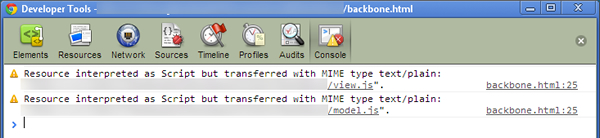
Resource interpreted as Script but transferred with MIME type text/plain
Uhmmm….??? Well at least Chrome gives some feedback, Firefox didn’t output anything to the console, and the page just didn’t work. After some googling, I came across a few people who have encountered this issue:
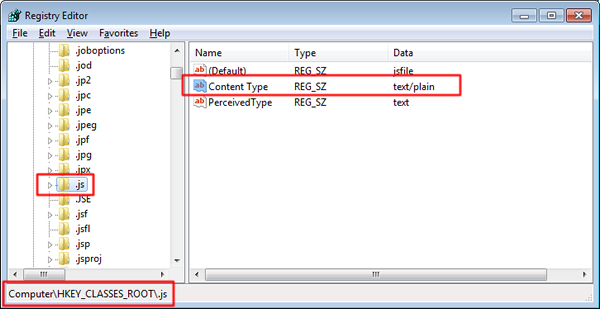
Apparently, when you install Visual Studio 2012 it decides to add a key in the registry defining the content type. What does it define it as?
Solution
The solution is simple, but requires a change in the registry, so please don’t message me if you don’t know what you are doing, and break your registry.
- Run -> regedit
- Go to HKEY_CLASSES_ROOT\.js

- To fix, there are two options
- Open up the entry ‘Content Type’, can change the value to ‘text/javascript’ (Recommended), or
- You can remove the entry ‘Content Type’ altogether, (I check my old computer, and the entry doesn’t exist).
That’s it, hope you don’t flip your table in rage!
More from the workshop
Its XUL Wizardry!
XRap on Sourceforge!

Thank you so mutch!!!!